# MagneticLogoCluster
About 150 logo marks fly in from off-screen, drift forever on the GPU, and bend toward the cursor.

## 1. Setup
// npm install framer-motion
File: components-workspace/magnetic-logo-cluster/index.tsx  ·  'use client'  ·  export default function MagneticLogoCluster()

import {
  motion,
  useMotionValue,
  useReducedMotion,
  useSpring,
  useTransform,
  type MotionValue,
} from 'framer-motion'
import {
  useEffect,
  useId,
  useMemo,
  useRef,
  useState,
  type CSSProperties,
  type ReactNode,
} from 'react'

Stock Tailwind v4 for the two root utilities only. Every colour is a hex literal and the pack's
own animation CSS is injected by the component, so there is nothing to add to a theme file.

## 2. Constants
Everything in this block sits above the component function, in this order. Paste it as is.

const DRIFT_ROT_AMPLITUDE = 3.5
const DRIFT_MAG_MIN_FRAC = 0.012
const DRIFT_MAG_MAX_FRAC = 0.03
const DRIFT_DURATION_MIN = 4
const DRIFT_DURATION_MAX = 8
const ENTRY_SPRING = { type: 'spring' as const, stiffness: 100, damping: 18, mass: 1 }
// Low mass + medium damping: a slight overshoot reaching for the cursor, gentle return.
const MAGNET_SPRING = { stiffness: 180, damping: 14, mass: 0.6 }
const PARKED = 99999

type Palette = {
  id: string
  from: string
  to: string
  mid: string
  dark: string
}

// Two families, light to dark, so the pack reads as depth rather than one flat colour.
const OLIVE_PALETTES: Palette[] = [
  { id: 'op0', from: '#EBF0C8', to: '#C5D672', mid: '#5C5C58', dark: '#262624' },
  { id: 'op1', from: '#DAE4A0', to: '#BECF5D', mid: '#4F4F4C', dark: '#1E1E1E' },
  { id: 'op2', from: '#BECF5D', to: '#92A143', mid: '#4F4F4C', dark: '#1E1E1E' },
  { id: 'op3', from: '#A8B94D', to: '#6E7E22', mid: '#3A3A38', dark: '#1A1A19' },
  { id: 'op4', from: '#869631', to: '#5C6A1C', mid: '#2E2E2C', dark: '#141413' },
]
const SAND_PALETTES: Palette[] = [
  { id: 'sp0', from: '#C8C8C0', to: '#BABAB4', mid: '#4F4F4C', dark: '#21211F' },
  { id: 'sp1', from: '#BABAB4', to: '#9E9E98', mid: '#383836', dark: '#1A1A19' },
  { id: 'sp2', from: '#9E9E98', to: '#7D7D78', mid: '#21211F', dark: '#141413' },
  { id: 'sp3', from: '#7D7D78', to: '#666662', mid: '#21211F', dark: '#141413' },
  { id: 'sp4', from: '#666662', to: '#4F4F4C', mid: '#1A1A19', dark: '#141413' },
]
const ALL_PALETTES: Palette[] = [...OLIVE_PALETTES, ...SAND_PALETTES]

// Weighted pool, biased dark so the light marks read as highlights: 30% accent, 70% neutral.
const PALETTE_WEIGHTS: Array<[Palette, number]> = [
  [OLIVE_PALETTES[0], 2],
  [OLIVE_PALETTES[1], 4],
  [OLIVE_PALETTES[2], 14],
  [OLIVE_PALETTES[3], 15],
  [OLIVE_PALETTES[4], 10],
  [SAND_PALETTES[0], 6],
  [SAND_PALETTES[1], 17],
  [SAND_PALETTES[2], 30],
  [SAND_PALETTES[3], 36],
  [SAND_PALETTES[4], 16],
]

// Deterministic randomness. Everything below is seeded, so server and client build the
// exact same pack and hydration never mismatches.

function mulberry32(seed: number) {
  let t = seed >>> 0
  return () => {
    t = (t + 0x6d2b79f5) >>> 0
    let x = t
    x = Math.imul(x ^ (x >>> 15), x | 1)
    x ^= x + Math.imul(x ^ (x >>> 7), x | 61)
    return ((x ^ (x >>> 14)) >>> 0) / 4294967296
  }
}

function shuffle<T>(arr: T[], seed: number): T[] {
  const out = arr.slice()
  const rand = mulberry32(seed)
  for (let i = out.length - 1; i > 0; i--) {
    const j = Math.floor(rand() * (i + 1))
    ;[out[i], out[j]] = [out[j], out[i]]
  }
  return out
}

function smoothstep(edge0: number, edge1: number, x: number) {
  const t = Math.min(1, Math.max(0, (x - edge0) / (edge1 - edge0)))
  return t * t * (3 - 2 * t)
}

// Halton: a low-discrepancy quasi-random generator. Index 1..N spreads points evenly across
// [0,1] without the clumping of Math.random or the visible rows of a grid layout.
function halton(index: number, base: number): number {
  let result = 0
  let f = 1
  let i = index
  while (i > 0) {
    f /= base
    result += f * (i % base)
    i = Math.floor(i / base)
  }
  return result
}

type Item = {
  id: number
  xFrac: number
  yFrac: number
  sizeFrac: number
  rotation: number
  palette: Palette
  iconIndex: number
  tint?: string
  fromXFrac: number
  fromYFrac: number
  driftXFrac: number
  driftYFrac: number
  driftDuration: number
  driftDelay: number
  entryDelay: number
  zIndex: number
}

type ClusterConfig = {
  count: number
  seed: number
  layout: 'diamond' | 'rect'
  spreadX: number
  spreadY: number
  minIconSize: number
  maxIconSize: number
  drift: number
  entryStagger: number
  iconCount: number
  tints: string[]
}

function buildCluster(cfg: ClusterConfig): Item[] {
  const pool: Palette[] = []
  for (const [palette, weight] of PALETTE_WEIGHTS) {
    // Scale the weights so the mix holds at any count, not just the default.
    const n = Math.max(1, Math.round((weight / 150) * cfg.count))
    for (let i = 0; i < n; i++) pool.push(palette)
  }
  const palettes = shuffle(pool, cfg.seed ^ 0xabcdef12)
  const items: Item[] = []

  for (let i = 0; i < cfg.count; i++) {
    const rand = mulberry32(cfg.seed * 0x2545f491 + 0x9e3779b1 + i * 2654435761)

    // 2D Halton points in the unit square. For the diamond layout, rotate them 45 degrees
    // (x' = u - v, y' = u + v) so the square maps to a rhombus with corners at (+-1, 0) and
    // (0, +-1). The +1 offset skips the degenerate first point; the jitter keeps it from
    // looking machined.
    const u = halton(i + 1, 2) - 0.5
    const v = halton(i + 1, 3) - 0.5
    const ux = cfg.layout === 'diamond' ? u - v : u * 2
    const uy = cfg.layout === 'diamond' ? u + v : v * 2
    const xFrac = ux * cfg.spreadX + (rand() - 0.5) * 0.018
    const yFrac = uy * cfg.spreadY + (rand() - 0.5) * 0.018

    // Size is fully random per icon, biased small so the big ones stay rare.
    const sizeFrac =
      cfg.minIconSize + Math.pow(rand(), 1.4) * (cfg.maxIconSize - cfg.minIconSize)

    // Entry origin: a random bearing, 1.6 to 2.0 container widths out, so the pack
    // converges from every direction at once.
    const fromAngle = rand() * Math.PI * 2
    const fromDist = 1.6 + rand() * 0.4

    const driftAngle = rand() * Math.PI * 2
    const driftMag =
      (DRIFT_MAG_MIN_FRAC + rand() * (DRIFT_MAG_MAX_FRAC - DRIFT_MAG_MIN_FRAC)) *
      cfg.drift

    items.push({
      id: i,
      xFrac,
      yFrac,
      sizeFrac,
      // Free base rotation in +-180 degrees; the float loop sways around this base.
      rotation: (rand() - 0.5) * 360,
      palette: palettes[i % palettes.length],
      iconIndex: cfg.iconCount > 0 ? i % cfg.iconCount : 0,
      tint: cfg.tints.length ? cfg.tints[Math.floor(rand() * cfg.tints.length)] : undefined,
      fromXFrac: Math.cos(fromAngle) * fromDist,
      fromYFrac: Math.sin(fromAngle) * fromDist,
      driftXFrac: Math.cos(driftAngle) * driftMag,
      driftYFrac: Math.sin(driftAngle) * driftMag,
      driftDuration:
        DRIFT_DURATION_MIN + rand() * (DRIFT_DURATION_MAX - DRIFT_DURATION_MIN),
      driftDelay: -rand() * DRIFT_DURATION_MAX,
      entryDelay: i * cfg.entryStagger,
      // Stack the bigger icons on top so they read as the foreground layer.
      zIndex: Math.round(sizeFrac * 10000),
    })
  }
  return items
}

// The float loop, plus the one rule that lets any artwork (inline SVG, an <img>, a whole
// component) fill its square slot without the caller having to style it.
const CLUSTER_CSS = `
.aicanvas-cluster-float {
  animation: aicanvas-cluster-float var(--ic-duration) ease-in-out var(--ic-delay) infinite alternate;
  will-change: transform;
  transform: translateZ(0);
}
.aicanvas-cluster-art > *,
.aicanvas-cluster-art > svg,
.aicanvas-cluster-art > img {
  display: block;
  width: 100%;
  height: 100%;
  object-fit: contain;
}
@keyframes aicanvas-cluster-float {
  from {
    transform:
      translate(calc(var(--ic-dx) * -1px), calc(var(--ic-dy) * -1px))
      rotate(calc((var(--ic-rot) - var(--ic-rot-amp)) * 1deg));
  }
  to {
    transform:
      translate(calc(var(--ic-dx) * 1px), calc(var(--ic-dy) * 1px))
      rotate(calc((var(--ic-rot) + var(--ic-rot-amp)) * 1deg));
  }
}
@media (prefers-reduced-motion: reduce) {
  .aicanvas-cluster-float { animation: none; }
}
`

/**
 * @typedef {object} MagneticLogoClusterProps
 * @property {React.ReactNode[]} [icons] Your logos or icons, cycled across the pack. Each one is rendered inside a square slot and scaled to fit, so inline SVG, an `<img>` or a whole component all work. Omit it to get the built-in placeholder mark.
 * @property {string[]} [tints=[]] Colours applied as CSS `color` to each slot, picked per icon. Monochrome marks drawn with `currentColor` pick this up; leave it empty to keep your artwork's own colours. Ignored by the built-in mark, which carries its own palette ladder.
 * @property {number} [count=150] How many icons make up the pack.
 * @property {number} [seed=1] Reshuffles the layout, sizes, entry bearings and drift. Same seed renders the same pack on server and client.
 * @property {'diamond' | 'rect'} [layout='diamond'] Pack silhouette. `diamond` is the rotated square with corners up/down/left/right; `rect` fills the container edge to edge.
 * @property {number} [spreadX=0.47] Half-width of the pack, as a fraction of the container. Raise it to stretch the shape horizontally.
 * @property {number} [spreadY=0.47] Half-height of the pack, as a fraction of the container.
 * @property {number} [minIconSize=0.024] Smallest icon, as a fraction of the container width.
 * @property {number} [maxIconSize=0.072] Largest icon, as a fraction of the container width.
 * @property {number} [magnetRadius=0.42] How far the cursor's pull reaches, as a fraction of the container.
 * @property {number} [magnetStrength=0.18] Peak displacement for an icon directly under the cursor, as a fraction of the container.
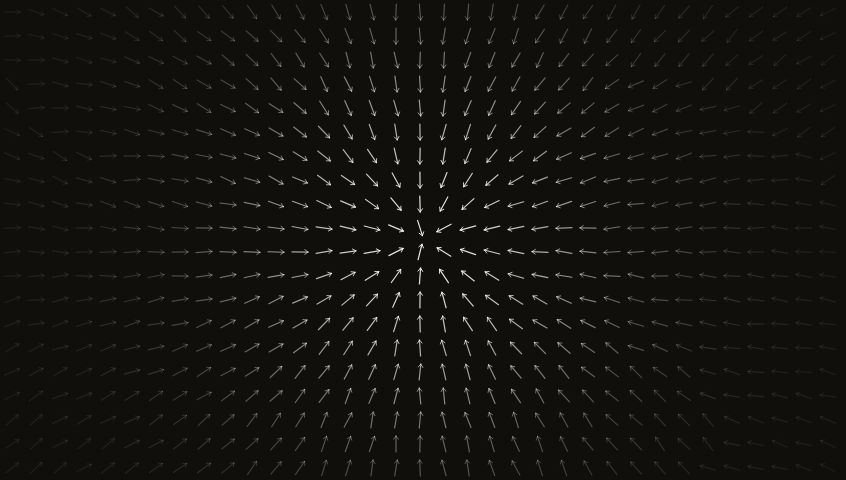
 * @property {number} [curl=0.3] Mixes in a push perpendicular to the pull, giving the field a swirl instead of a straight-line tug. 0 is a pure radial magnet.
 * @property {number} [drift=1] Multiplier on the idle floating motion. 0 holds the pack perfectly still once it lands.
 * @property {number} [entryStagger=0.012] Seconds between each icon launching, so the pack converges in a wave rather than all at once.
 * @property {boolean} [autoDemo=true] Runs one scripted cursor sweep across the pack after the entry settles, so a visitor who never moves their mouse still sees the magnetic interaction. Cancels the moment they move it themselves.
 * @property {string} [ariaLabel='A drifting cluster of logo marks'] Label for the cluster, which is exposed as a single decorative image to assistive tech.
 * @property {string} [className] Extra classes merged onto the outermost root element.
 */
export type MagneticLogoClusterProps = {
  icons?: ReactNode[]
  tints?: string[]
  count?: number
  seed?: number
  layout?: 'diamond' | 'rect'
  spreadX?: number
  spreadY?: number
  minIconSize?: number
  maxIconSize?: number
  magnetRadius?: number
  magnetStrength?: number
  curl?: number
  drift?: number
  entryStagger?: number
  autoDemo?: boolean
  ariaLabel?: string
  className?: string
}

## 3. State
### MagneticLogoCluster: the default export, signature and everything before `return (`

export default function MagneticLogoCluster({
  icons,
  tints = [],
  count = 150,
  seed = 1,
  layout = 'diamond',
  spreadX = 0.47,
  spreadY = 0.47,
  minIconSize = 0.024,
  maxIconSize = 0.072,
  magnetRadius = 0.42,
  magnetStrength = 0.18,
  curl = 0.3,
  drift = 1,
  entryStagger = 0.012,
  autoDemo = true,
  ariaLabel = 'A drifting cluster of logo marks',
  className = '',
}: MagneticLogoClusterProps) {
  const reduceMotion = useReducedMotion() ?? false
  // Namespaces the gradient ids so two clusters on one page never collide.
  const uid = useId().replace(/:/g, '')
  const iconCount = icons?.length ?? 0

  // Compared by value, not identity, so a caller passing a fresh array literal on every
  // render does not rebuild the whole pack.
  const tintsKey = tints.join('|')

  const items = useMemo(
    () =>
      buildCluster({
        count,
        seed,
        layout,
        spreadX,
        spreadY,
        minIconSize,
        maxIconSize,
        drift,
        entryStagger,
        iconCount,
        tints,
      }),
    // eslint-disable-next-line react-hooks/exhaustive-deps
    [
      count,
      seed,
      layout,
      spreadX,
      spreadY,
      minIconSize,
      maxIconSize,
      drift,
      entryStagger,
      iconCount,
      tintsKey,
    ],
  )

  const clusterRef = useRef<HTMLDivElement | null>(null)
  const [size, setSize] = useState(0)
  // Once the visitor drives the cursor themselves, the scripted demo stops.
  const interactedRef = useRef(false)
  // The demo is a one-time introduction. Without this it would replay every time the
  // container is re-measured, and on mobile the URL bar collapsing does exactly that.
  const demoPlayedRef = useRef(false)

  const mouseX = useMotionValue(PARKED)
  const mouseY = useMotionValue(PARKED)

  useEffect(() => {
    const el = clusterRef.current
    if (!el) return
    const ro = new ResizeObserver((entries) => {
      setSize(entries[0]?.contentRect.width ?? 0)
    })
    ro.observe(el)
    return () => ro.disconnect()
  }, [])

  // Pointer is tracked on the whole surface, not just the pack, so icons start reaching
  // before the cursor arrives. Coordinates are relative to the pack's centre, which is
  // where the rest points are measured from.
  function handlePointer(e: React.PointerEvent<HTMLDivElement>) {
    if (reduceMotion || !clusterRef.current) return
    interactedRef.current = true
    const rect = clusterRef.current.getBoundingClientRect()
    mouseX.set(e.clientX - rect.left - rect.width / 2)
    mouseY.set(e.clientY - rect.top - rect.height / 2)
  }
  function handlePointerLeave() {
    mouseX.set(PARKED)
    mouseY.set(PARKED)
  }

  // One scripted ghost-cursor pass right after the entry settles: the same motion values
  // are animated along an arc from the left edge, through the centre, out past the right
  // edge. Icons reach for the invisible cursor and trail behind it, showing the interaction
  // to someone who never touches the page. Skipped for reduced motion, abandoned on first
  // real input.
  useEffect(() => {
    if (!autoDemo || reduceMotion || size <= 0 || demoPlayedRef.current) return

    const entryDoneMs = count * entryStagger * 1000 + 900 // stagger + spring settle
    const startDelay = entryDoneMs + 400
    const sweepDuration = 1500
    const pauseAfter = 400

    let cancelled = false
    let rafId = 0
    let parkTimer = 0

    const startTimer = window.setTimeout(() => {
      if (cancelled || interactedRef.current) return
      demoPlayedRef.current = true
      const startedAt = performance.now()

      const tick = () => {
        if (cancelled || interactedRef.current) {
          mouseX.set(PARKED)
          mouseY.set(PARKED)
          return
        }
        const t = Math.min(1, (performance.now() - startedAt) / sweepDuration)
        // Ease in/out so the ghost cursor does not snap into motion.
        const eased = t < 0.5 ? 2 * t * t : 1 - Math.pow(-2 * t + 2, 2) / 2
        // Ends past the right edge, so the trailing icons spill toward whatever copy sits
        // beside the pack.
        const startX = -size * 0.45
        const endX = size * 0.65
        mouseX.set(startX + (endX - startX) * eased)
        // A gentle sine makes the path a soft arc rather than a flat line.
        mouseY.set(Math.sin(eased * Math.PI) * size * -0.08)
        if (t < 1) {
          rafId = requestAnimationFrame(tick)
        } else {
          // Hold briefly, then park far away so the springs return to rest.
          parkTimer = window.setTimeout(() => {
            if (cancelled) return
            mouseX.set(PARKED)
            mouseY.set(PARKED)
          }, pauseAfter)
        }
      }
      rafId = requestAnimationFrame(tick)
    }, startDelay)

    return () => {
      cancelled = true
      window.clearTimeout(startTimer)
      window.clearTimeout(parkTimer)
      cancelAnimationFrame(rafId)
    }
  }, [autoDemo, size, count, entryStagger, reduceMotion, mouseX, mouseY])

### ClusterIcon: props and everything before its `return (`

function ClusterIcon({
  item,
  size,
  mouseX,
  mouseY,
  reduceMotion,
  magnetRadius,
  magnetStrength,
  curl,
  uid,
  children,
}: {
  item: Item
  size: number
  mouseX: MotionValue<number>
  mouseY: MotionValue<number>
  reduceMotion: boolean
  magnetRadius: number
  magnetStrength: number
  curl: number
  uid: string
  children?: ReactNode
}) {
  const restX = item.xFrac * size
  const restY = item.yFrac * size
  const box = item.sizeFrac * size
  const influence = magnetRadius * size
  const strength = magnetStrength * size

  // Radial attraction with a smoothstep falloff over the influence radius, plus a tangential
  // component so the field swirls instead of tugging in a straight line. Returning 0 past the
  // radius parks the spring, which is why no explicit proximity gate is needed.
  const magnetX = useTransform([mouseX, mouseY], (input) => {
    const [mx, my] = input as [number, number]
    const dx = mx - restX
    const dy = my - restY
    const d = Math.hypot(dx, dy)
    if (d >= influence || d < 0.0001) return 0
    const fall = 1 - smoothstep(0, influence, d)
    const normX = dx / d
    const tanX = -(dy / d)
    return (normX + tanX * curl) * strength * fall
  })
  const magnetY = useTransform([mouseX, mouseY], (input) => {
    const [mx, my] = input as [number, number]
    const dx = mx - restX
    const dy = my - restY
    const d = Math.hypot(dx, dy)
    if (d >= influence || d < 0.0001) return 0
    const fall = 1 - smoothstep(0, influence, d)
    const normY = dy / d
    const tanY = dx / d
    return (normY + tanY * curl) * strength * fall
  })

  const springX = useSpring(magnetX, MAGNET_SPRING)
  const springY = useSpring(magnetY, MAGNET_SPRING)

  // Per-icon amplitude, period and phase feed the shared @keyframes loop, so the pack never
  // sways in unison.
  const floatStyle: CSSProperties = {
    width: '100%',
    height: '100%',
    ['--ic-dx' as never]: item.driftXFrac * size,
    ['--ic-dy' as never]: item.driftYFrac * size,
    ['--ic-rot' as never]: item.rotation,
    ['--ic-rot-amp' as never]: DRIFT_ROT_AMPLITUDE,
    ['--ic-duration' as never]: `${item.driftDuration}s`,
    ['--ic-delay' as never]: `${item.driftDelay}s`,
  }

  const artwork = children ?? <DefaultMark palette={item.palette} uid={uid} />

## 4. Tree
### MagneticLogoCluster (root)

<div onPointerMove={handlePointer} onPointerLeave={handlePointerLeave}
     className={`relative flex min-h-screen w-full items-center justify-center overflow-hidden bg-[#EFEFEA] dark:bg-[#0E0E0F] ${className}`}
     style={{ touchAction: 'pan-y' }}>
  <style dangerouslySetInnerHTML={{ __html: CLUSTER_CSS }} />
  <GradientDefs uid={uid} />
  <div ref={clusterRef} role='img' aria-label={ariaLabel} className='relative aspect-square' style={{ width: 'min(86vw, 78vh, 640px)' }}>
    [if size > 0]
      <ClusterIcon key={item.id} item={item} size={size} mouseX={mouseX} mouseY={mouseY} reduceMotion={reduceMotion} magnetRadius={magnetRadius} magnetStrength={magnetStrength} curl={curl} uid={uid}>   [map items.map]
        {icons?.[item.iconIndex]}

This root already carries min-h-screen and w-full, so a naked paste fills the viewport with no
edit. Do not swap it for h-full: the whole layer stack under it is absolutely positioned and
would collapse. touchAction is pan-y, not none, so the pack tracks a finger dragging across it
while the page underneath can always still be scrolled away from.

### GradientDefs({ uid })
One hidden svg holds every gradient, so each mark references a def by id instead of carrying
its own.

<svg aria-hidden='true' width='0' height='0' style={{ position: 'absolute', width: 0, height: 0 }}>
  <defs>
    <linearGradient key={p.id} id={`${uid}-${p.id}`} x1='9' y1='3' x2='24.8756' y2='17' gradientUnits='userSpaceOnUse'>   [map ALL_PALETTES.map((p) => ...)]
      <stop stopColor={p.from} />
      <stop offset='1' stopColor={p.to} />

### DefaultMark({ palette, uid })
The built-in placeholder: an isometric cube in three tones, replaced wholesale the moment the
caller passes `icons`.

<svg viewBox='0 0 28 24' fill='none' aria-hidden='true'>
  <path fillRule='evenodd' clipRule='evenodd' fill={`url(#${uid}-${palette.id})`}
    d='M19.8513 0C20.5626 0 21.2204 0.377823 21.5788 0.992258L22.75 3L27.4122 10.9923C27.7754 11.615 27.7754 12.385 27.4122 13.0077L22.75 21L21.5788 23.0077C21.2204 23.6222 20.5626 24 19.8513 24H8.14874C7.43741 24 6.7796 23.6222 6.42118 23.0077L0.587849 13.0077C0.224593 12.385 0.224593 11.615 0.58785 10.9923L6.42118 0.992257C6.7796 0.377822 7.43741 0 8.14874 0H19.8513ZM4 12L9 21H18.25L13 12L18.25 3H9L4 12Z' />
  <path fillRule='evenodd' clipRule='evenodd' fill={palette.dark}
    d='M9 21L4 12H13L18.25 21H9Z' />
  <path fillRule='evenodd' clipRule='evenodd' fill={palette.mid}
    d='M13 12H4L9 3H18.25L13 12Z' />

### ClusterIcon(...)
Four nested layers, one job each: outer pins the centre in px, magnet carries the spring-lagged
cursor pull, entry runs the one-shot fly-in, float runs the CSS drift.

<div style={{ position: 'absolute', left: `calc(50% + ${restX}px)`, top: `calc(50% + ${restY}px)`, width: box, height: box, marginLeft: -box / 2, marginTop: -box / 2, zIndex: item.zIndex, color: item.tint, pointerEvents: 'none' }}>
  <motion.div style={{ width: '100%', height: '100%', x: reduceMotion ? 0 : springX, y: reduceMotion ? 0 : springY, willChange: 'transform' }}>
    <motion.div style={{ width: '100%', height: '100%' }}
      initial={reduceMotion ? false : { x: item.fromXFrac * size, y: item.fromYFrac * size, opacity: 0, scale: 0.5 }}
      animate={{ x: 0, y: 0, opacity: 1, scale: 1 }}
      transition={{ ...ENTRY_SPRING, delay: reduceMotion ? 0 : item.entryDelay }}>
      [if reduceMotion]
        <div className='aicanvas-cluster-art' style={{ width: '100%', height: '100%', transform: `rotate(${item.rotation}deg)` }}>
          {artwork}
      [if !reduceMotion]
        <div className='aicanvas-cluster-art aicanvas-cluster-float' style={floatStyle}>
          {artwork}

## 5. Why
- The magnet transform returns 0 past `influence`, which parks that icon's spring, so only icons near the cursor cost anything per frame. No proximity gate, no loop over all 150, do not add one.
- Drift is CSS `@keyframes` fed by per-icon custom properties, so at rest zero JS runs per frame. Re-expressing it as a framer-motion `animate` puts 150 live animations on the main thread and drops the frame rate.
- Every random value comes from `mulberry32` seeded off `seed`, so server and client build an identical pack. A bare `Math.random()` anywhere in `buildCluster` gives a hydration mismatch and a fresh shuffle on every re-render.
- Positions are Halton (base 2 and 3), not uniform random: uniform random clumps and leaves holes, a grid shows rows. The 45 degree rotation `u - v` / `u + v` is what makes the diamond.
- `mouseX` / `mouseY` park at `PARKED = 99999` rather than null or undefined, so the transforms stay on one numeric path and every spring eases back to rest instead of snapping.
- Ordering: `size` arrives from a ResizeObserver and icons render only once `size > 0`, because every rest point, entry origin, drift amplitude and magnet radius is a fraction of the measured width.
- The scripted sweep is one-shot by `demoPlayedRef` and abandoned by `interactedRef`. Without the first it replays on every re-measure, which a mobile URL bar collapsing triggers; without the second it fights the visitor's own cursor.
- Reduced motion is a real second render path, not a speed change: `initial={false}`, x/y pinned to 0, the float class dropped for a static `rotate`, and `handlePointer` returning early.

## 6. Remix
- Your marks instead of the built-in one: pass `icons` (any inline SVG, `<img>` or component; the `.aicanvas-cluster-art > *` rule scales each to its square slot) and `tints` for monochrome art drawn with `currentColor`. `DefaultMark`, `OLIVE_PALETTES`, `SAND_PALETTES` and `PALETTE_WEIGHTS` then go unused, and the weights are what to edit if you keep it.
- Reshape the pack: `layout` 'diamond' or 'rect', `spreadX` / `spreadY` 0.47, `minIconSize` 0.024 to `maxIconSize` 0.072, `count` 150, and the `Math.pow(rand(), 1.4)` size bias that keeps the big marks rare.
- Retune the field: `magnetRadius` 0.42, `magnetStrength` 0.18, `curl` 0.3 (0 is a pure radial magnet), `MAGNET_SPRING` { stiffness: 180, damping: 14, mass: 0.6 }, and for the idle loop `drift`, `DRIFT_DURATION_MIN` 4, `DRIFT_DURATION_MAX` 8, `DRIFT_ROT_AMPLITUDE` 3.5.

## 7. Check
A line that fails is a bug in your build; fix it and re-check.
- A naked paste fills the viewport: root is `min-h-screen w-full` on `bg-[#EFEFEA] dark:bg-[#0E0E0F]`, with one centred square of `min(86vw, 78vh, 640px)` holding the pack.
- Every hex value and every key expression appears unchanged from block 2: all 40 palette entries across `OLIVE_PALETTES` and `SAND_PALETTES`, plus `key={p.id}` in `GradientDefs` and `key={item.id}` in the items map.
- Every element carrying initial/animate/exit is a `motion.div`, not a plain tag: the magnet layer and the entry layer both are, while the float layer stays a plain `div` because its animation is CSS.
- Reload three times: the identical pack every time, and no hydration warning in the console. A pack that reshuffles means an unseeded random survived somewhere in `buildCluster`.
- Hold the cursor still inside the pack: icons within `magnetRadius * size` sit displaced and swirled off their rest points, and every icon outside that radius is completely unmoved.
- Leave the surface: `handlePointerLeave` parks both motion values and within about a second every icon has eased back onto its rest point, with the slow drift still running.
- Load the page and touch nothing: about 2.5s after the entry settles one invisible cursor crosses left to right on a shallow arc, once, and never again. Moving the real mouse mid-sweep abandons it on the next frame.
- Set the OS to reduce motion: the pack is simply there, no fly-in, no drift, no swaying, and the cursor does nothing at all.

 AI Canvas