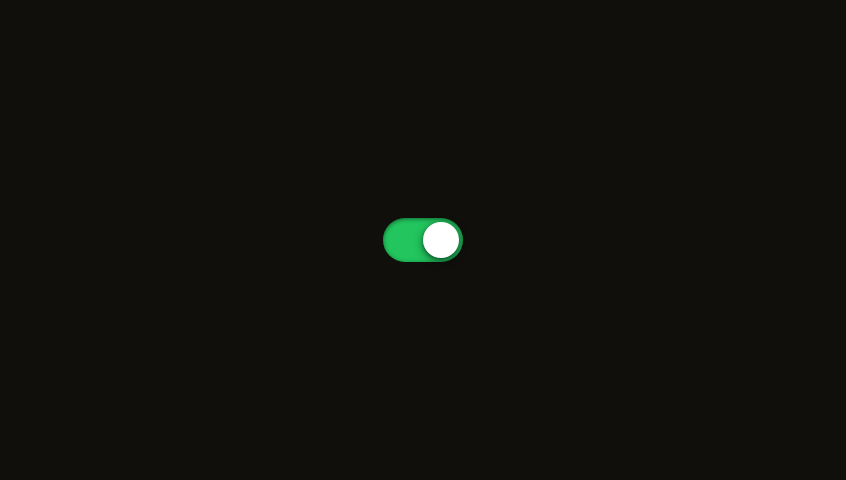
Glass ToggleOn/off toggles with glass housing and liquid-feel spring animation.
Buttons & TogglesGlassInteractive
Dark mode only
Refresh
Full screen
.png)
Preferences
Dark ModeOn
NotificationsOn
Auto-UpdateOff
AnalyticsOff
Haptic FeedbackOn
'use client'
// npm install framer-motion
import { useState, useEffect } from 'react'
import { motion, useSpring, useTransform } from 'framer-motion'
function Toggle({
label,
defaultOn = false,
color,
delay,
}: {
label: string
defaultOn?: boolean
color: string
delay: number
}) {
const [on, setOn] = useState(defaultOn)
const progress = useSpring(defaultOn ? 1 : 0, { stiffness: 300, damping: 22 })
useEffect(() => {
progress.set(on ? 1 : 0)
}, [on, progress])
const trackBg = useTransform(
progress,
[0, 1],
['rgba(255,255,255,0.08)', `${color}44`]
)
const trackBorder = useTransform(
progress,
[0, 1],
['rgba(255,255,255,0.1)', `${color}55`]
)
const thumbX = useTransform(progress, [0, 1], [2, 26])
const thumbShadow = useTransform(
progress,
[0, 1],
['0 2px 8px rgba(0,0,0,0.3)', `0 2px 16px ${color}44`]
)
return (
<motion.div
initial={{ opacity: 0, x: -16 }}
animate={{ opacity: 1, x: 0 }}
transition={{ type: 'spring', stiffness: 200, damping: 22, delay }}
className="flex items-center justify-between"
>
<div className="flex flex-col">
<span className="text-sm font-medium text-white/60">{label}</span>
<motion.span
animate={{ opacity: on ? 1 : 0.5 }}
className="text-[11px]"
style={{ color: on ? color : 'rgba(255,255,255,0.25)' }}
>
{on ? 'On' : 'Off'}
</motion.span>
</div>
<motion.button
onClick={() => setOn(!on)}
className="relative h-8 w-14 cursor-pointer rounded-full p-0"
style={{
background: trackBg as unknown as string,
border: '1px solid',
borderColor: trackBorder as unknown as string,
boxShadow: on ? `0 0 20px ${color}15, inset 0 1px 2px rgba(0,0,0,0.1)` : 'inset 0 1px 2px rgba(0,0,0,0.2)',
}}
whileTap={{ scale: 0.95 }}
>
{/* Glow when on */}
<motion.div
className="absolute inset-0 rounded-full"
animate={{ opacity: on ? 0.3 : 0 }}
style={{ background: `radial-gradient(circle at 75% 50%, ${color}, transparent 70%)` }}
/>
{/* Thumb */}
<motion.div
className="absolute top-1/2 h-6 w-6 rounded-full"
style={{
x: thumbX,
y: '-50%',
background: on
? `linear-gradient(135deg, rgba(255,255,255,0.95), rgba(255,255,255,0.85))`
: 'linear-gradient(135deg, rgba(255,255,255,0.7), rgba(255,255,255,0.5))',
boxShadow: thumbShadow,
}}
>
{/* Thumb inner highlight */}
<div
className="absolute inset-[2px] rounded-full"
style={{
background: 'linear-gradient(180deg, rgba(255,255,255,0.5) 0%, transparent 60%)',
}}
/>
</motion.div>
</motion.button>
</motion.div>
)
}
export default function GlassToggle() {
return (
<div className="relative flex min-h-screen w-full items-center justify-center overflow-hidden bg-[#1A1A19]">
{/* Background image */}
<img
src="https://ik.imagekit.io/aitoolkit/bg%20images/Ethereal%20Orange%20Flower%201%20(1).png"
alt=""
className="pointer-events-none absolute inset-0 h-full w-full object-cover opacity-60"
/>
{/* Settings panel */}
<motion.div
initial={{ y: 20, scale: 0.96 }}
animate={{ y: 0, scale: 1 }}
transition={{ type: 'spring', stiffness: 200, damping: 22 }}
className="relative isolate flex w-[320px] flex-col gap-5 rounded-3xl px-7 py-7"
style={{
background: 'rgba(255, 255, 255, 0.06)',
border: '1px solid rgba(255, 255, 255, 0.1)',
boxShadow: '0 12px 40px rgba(0, 0, 0, 0.35), inset 0 1px 0 rgba(255, 255, 255, 0.08)',
}}
>
{/* Blur layer — non-animating, isolated from entrance spring */}
<div
className="pointer-events-none absolute inset-0 z-[-1] rounded-3xl"
style={{ backdropFilter: 'blur(24px) saturate(1.6)', WebkitBackdropFilter: 'blur(24px) saturate(1.6)' }}
/>
{/* Top highlight */}
<div
className="absolute left-7 right-7 top-0 h-[1px]"
style={{ background: 'linear-gradient(90deg, transparent, rgba(255,255,255,0.2), transparent)' }}
/>
{/* Header */}
<h3 className="text-base font-semibold text-white/80">Preferences</h3>
<Toggle label="Dark Mode" defaultOn={true} color="#FF6BF5" delay={0.1} />
<div className="h-[1px] w-full" style={{ background: 'rgba(255,255,255,0.06)' }} />
<Toggle label="Notifications" defaultOn={true} color="#06D6A0" delay={0.15} />
<div className="h-[1px] w-full" style={{ background: 'rgba(255,255,255,0.06)' }} />
<Toggle label="Auto-Update" defaultOn={false} color="#FFBE0B" delay={0.2} />
<div className="h-[1px] w-full" style={{ background: 'rgba(255,255,255,0.06)' }} />
<Toggle label="Analytics" defaultOn={false} color="#FF7B54" delay={0.25} />
<div className="h-[1px] w-full" style={{ background: 'rgba(255,255,255,0.06)' }} />
<Toggle label="Haptic Feedback" defaultOn={true} color="#3A86FF" delay={0.3} />
</motion.div>
</div>
)
}
Add to your project
One command adds this component to your project.
1
Run the following command. New project? Run npx shadcn@latest init first to set up Tailwind and path aliases.
npx shadcn@latest add @aicanvas/glass-toggle2
For dark mode, add the dark class to your <html> element:
<html class="dark">